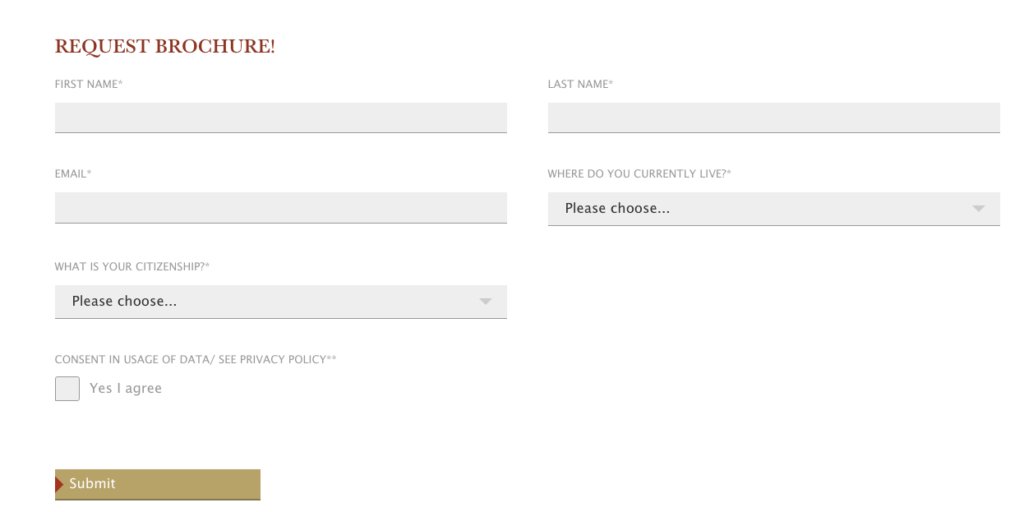
Powermail Plugin Main Settings
Double Opt-In Message
If “Mail must be confirmed (double opt-in)” is selected, the text in the double opt-in mail can be customized via the “Double opt-in message” field.
Image for mail to user
If the email to the user should have a header image, this can be stored here in the dimensions 600x250px.
Additional URL parameter string
If the links in the mail are to be trackable, this function can be used to add mtm characteristics. Example:
“?mtm_source=typo3&mtm_medium=mailing&mtm_content=&mtm_campaign=t3-sea-auto-reply”
Powermail Form features
CAS/ SharePoint API
More information on the API itself can be found here.
Basically, the following CAS fields can be imported (as of now):
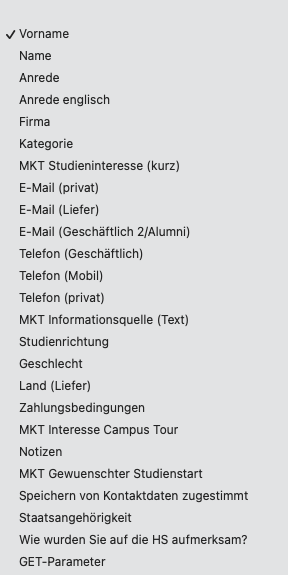
Field types in need of explanation
GET-Parameter
This field was needed before the conversion export ran via Matomo. It separates the GET parameters at the URL and transfers them to the SharePoint.
Ajax file upload
This functionality can be used for file uploads via Powermail forms. With the Ajax upload, files several GB in size can also be uploaded to our web server without any problems.
Captcha Fox
Capcha Fox is a classic captcha that prevents bots from filling out forms.
Current page URL
The “Current page URL” transfers the current URL including GET parameters and is usually transferred to “MKT Informationsquelle Text” so that the origin of the data records is documented (e.g. SEA campaign).