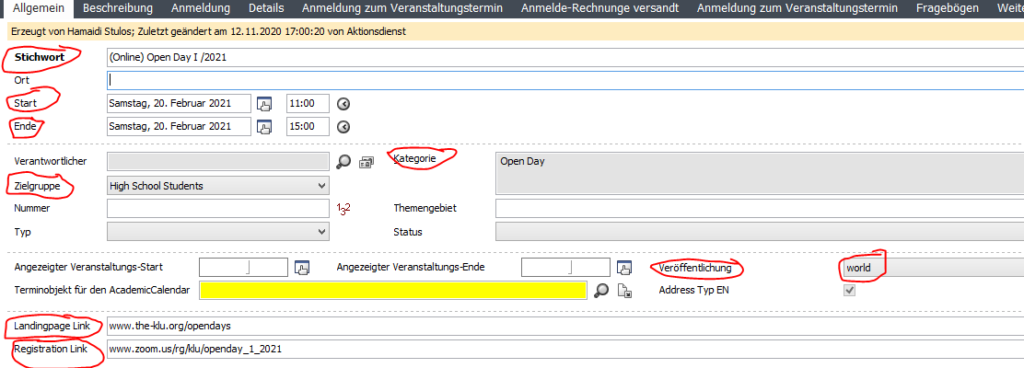
How to create an event in CAS that will be played automatically on the website (only works for events of type “link”).

With the new web API between CAS Events and Typo3 you save yourself the work of having to create the event separately in Typo3 after it has been created in CAS – at least as long as it is an event entry that redirects to another page. A so-called link event.
Please follow these steps, in order to publish a link event from CAS:
- Open CAS
- Open the event you want to publish, or create a new event
- Fill the necessary fields (more on this below)
- Save the event
- Wait for max 5 minutes (this is the update interval)
- If necessary, go to typo3 and add a picture (this is not possible via CAS)
- If you feel the need, check in the front-end if everything went fine
A CAS event meets the requirements to be played automatically on the homepage if the following fields are filled in:
- Stichwort
- Start
- Ende
- Zielgruppe
- Kategorie
- Landingpage Link (the event-page you want to link to)
- Registration link (not necessary for publication on the homepage)
- Veröffentlichung = world
If one of these fields is not filled in or the publication category “World” is not selected, there will be no automatic publication on the homepage.